thegeneralyst/AnopaDocs
PDP

CompareAt Price Display

Standalone compare-at price display with granular currency formatting, supporting PDP and product card modes.
What it does

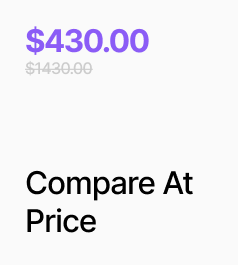
APCompareAtPriceDisplay is a standalone compare-at price display with granular currency formatting control. It can read from the selected variant in PDP mode or fetch data by Product ID in card mode. Unlike APVariantPrice, it exposes separate prefix and suffix currency chunks, each independently configurable as symbol, ISO code, or custom text. The component can optionally apply a strikethrough style to the compare-at value and can hide itself entirely when no valid compare-at price is present.

How to set it up

  • Place the component on your PDP or product card.
  • PDP mode: Leave Product ID empty. The component will read the compare-at price from the currently selected variant on the PDP.
  • Card mode: Enable Outside PDP and set the Product ID. The component will fetch the compare-at price for the first available variant (or first variant, depending on configuration).
  • Configure formatting options for decimals, strikethrough, and whether to show prefix/suffix currency chunks.
  • Configure typography options for font and color to match your design system.

Key behaviours

  • When Outside PDP is enabled, the component fetches the compare-at price for the first available variant of the product identified by Product ID (or first variant if availability preference is disabled).
  • The displayed value can optionally have a strikethrough applied via the Formatting — Strike Through setting.
  • Prefix and suffix currency chunks are independently configurable, allowing you to show a symbol, ISO currency code, or custom text before and/or after the numeric amount.
  • When Hide when 0 / missing is enabled, the component renders nothing if the compare-at price is zero, missing, or otherwise unavailable.
  • Decimal precision is configurable so you can match your store’s currency formatting requirements.
  • Typography (font and color) is fully configurable so the compare-at price can visually differentiate from the main price.

Property Controls

ControlTypeDefaultDescription
Outside PDPBooleanfalseEnable for product cards to fetch compare-at price by Product ID instead of using the PDP selected variant.
Product IDStringProduct identifier used in Outside PDP mode; required when Outside PDP is enabled.
Prefer AvailableBooleantrueWhen fetching by Product ID, pick the first available variant; if disabled, uses the first variant regardless of availability.
Hide when 0 / missingBooleanfalseWhen enabled, the component renders nothing if the compare-at price is zero or unavailable.
Formatting — DecimalsNumber2Number of decimal places to display for the compare-at price.
Formatting — Strike ThroughBooleantrueApply a strikethrough style to the displayed compare-at price value.
Formatting — Show PrefixBooleantrueToggle visibility of the currency prefix chunk before the numeric amount.
Formatting — Prefix CurrencyObjectSymbol, USDConfiguration for the prefix currency chunk, including type (symbol/code/custom), currency code, and custom symbol or text.
Formatting — Show SuffixBooleanfalseToggle visibility of the currency suffix chunk after the numeric amount.
Typography — FontFont14pxFont settings for the compare-at price text, including size, weight, and family.
Typography — ColorColor#888888Text color used for the compare-at price display.